If you’re serious about solo mining Bitcoin, securing your earnings is crucial. A reliable hardware wallet will keep your coins safe from hackers and online threats. These wallets combine top-notch security with user-friendly designs, making it easy to access your funds whenever you need them.
Bitcoin Hardware Wallets: In-Depth Guide to Choosing, Securing, and Using Them (2026 Edition)
Keep your Bitcoin safe and easily accessible with these top-notch hardware wallets designed for solo mining
Product List

ArlinaL Steel Bitcoin Wallet, Cryptocurrency...
Product Review Score
4.51 out of 5 stars
(183 reviews)
TANGEM Crypto Wallet Pack of 2 – Trusted Cold...
Product Review Score
4.16 out of 5 stars
(63 reviews)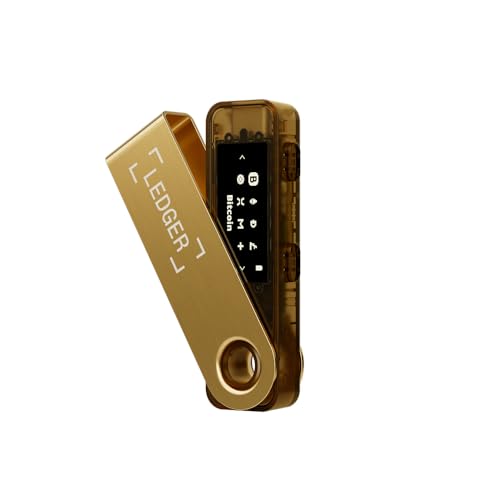

ELLIPAL Titan 2.0 Air-Gapped Crypto Wallet –...
Product Review Score
4.81 out of 5 stars
(126 reviews)
D'CENT Hardware Wallet 2-Pack | Biometric Col...
Product Review Score
4.26 out of 5 stars
(30 reviews)
TANGEM Crypto Wallet Pack of 3 – Trusted Cold...
Product Review Score
4.4 out of 5 stars
(7 reviews)
imKey Pro Crypto Hardware Wallet Secure Cold...
Product Review Score
4.68 out of 5 stars
(62 reviews)
SecuX Shield Bio Crypto Hardware Wallet - Sec...
Product Review Score
4.16 out of 5 stars
(60 reviews)
ELLIPAL X Card Crypto Wallet – Cold Wallet fo...
Product Review Score
4.13 out of 5 stars
(226 reviews)
Ballet Bitcoin Hardware Wallet Card - Offline...
Product Review Score
4.89 out of 5 stars
(97 reviews)Hardware wallets (also called cold wallets or signing devices) are purpose-built physical devices that store your Bitcoin private keys offline. They never expose the keys to an internet-connected computer or phone. When you want to send Bitcoin, the companion software prepares an unsigned transaction, the hardware wallet displays the details for you to verify, signs it internally, and returns only the signed transaction. Your keys stay isolated.
This is the strongest practical protection against remote hacking, malware, and phishing for most people. “Not your keys, not your Bitcoin” is still the core principle. Exchanges and software wallets keep keys online or more exposed; hardware wallets move the critical secrets offline.
As of late 2026, the landscape includes mature options from Trezor, Ledger, Coinkite (Coldcard), Shift Crypto (BitBox), Blockstream (Jade), Foundation (Passport), and others. No single device is perfect for everyone—security, usability, Bitcoin-only focus, open-source transparency, air-gapping, and price all involve trade-offs. A major 2026 Coldcard seed-generation entropy bug (affecting seeds created on certain older firmware versions since 2021, with estimated losses exceeding $100 million in some reports) underscored that even dual secure elements do not protect against weak randomness during setup, and that firmware updates do not fix already-generated weak seeds.
How Hardware Wallets Work and Why They Matter
Private keys control your Bitcoin. A hardware wallet generates them on-device (ideally with strong entropy, optionally supplemented by user-provided dice rolls or coin flips), stores them in a secure element or protected environment, and requires physical confirmation on its own screen for every spend. Malware on your computer can show a wrong address, but if you verify the full address and amount on the device itself, the attack fails.
Key advantages:
- Offline key isolation.
- On-device verification of recipient and amount (defeats address-swapping malware).
- PIN protection + optional passphrase (the “25th word”).
- Recovery via seed phrase (usually 12–24 BIP-39 words, or SLIP-39 Shamir shares on some devices).
Limitations: You can still lose funds through user error (lost seed, phishing, physical theft + weak PIN, supply-chain tampering, or weak seed generation). The device itself is a single point of failure without good backups or multisig.
Research Before Buying: What to Check
- Buy only from the manufacturer or authorized resellers listed on their official site. Avoid Amazon/eBay third-party sellers, used devices, or “pre-configured” units. A genuine device generates its seed during your setup. Reject anything with a pre-printed seed phrase.
- Verify authenticity on first connection using the official companion app (cryptographic checks are common).
- Firmware and open source: Prefer open-source (or fully source-available with reproducible builds) firmware so independent researchers can audit it. Closed systems require more trust in the vendor. Check recent security track record and how quickly issues are disclosed/fixed.
- Secure element: A certified secure element (often EAL5+/EAL6+) resists physical extraction better than a general-purpose chip. Dual secure elements from different vendors (e.g., Coldcard) add resilience. Note: the 2026 Coldcard losses occurred despite dual elements because the bug was in seed generation entropy, not chip extraction.
- Air-gap capability: Some devices can sign via QR codes or microSD without ever connecting via USB/Bluetooth. This reduces certain attack surfaces.
- Screen quality and verification: Larger, clear displays (color touch or E Ink) make it easier to verify addresses carefully. Small two-button screens are harder to read.
- Bitcoin-only vs multi-coin: Bitcoin-only firmware has a smaller attack surface. Multi-coin is convenient if you hold other assets but adds code complexity.
- Companion software and ecosystem: Works with Sparrow, Electrum, or vendor apps. Check iPhone/Android support if relevant.
- Backup method: Standard BIP-39, optional Shamir (SLIP-39), or device-specific. Metal backups are strongly recommended.
- Price vs features: Entry models start ~$50–80; premium air-gapped or large-screen models run $150–400. Buy current firmware versions.
Also research the vendor’s history of data leaks, supply-chain issues, and response to vulnerabilities. Check recent independent reviews and the official security advisories.
Main Types and Leading Options (Approximate 2026 Pricing)
Prices fluctuate; always check official sites. Bitcoin-only editions are available on several multi-coin brands.
USB / Bluetooth signers (most user-friendly for beginners):
- Trezor Safe 3 / Safe 5 / Safe 7: Fully open-source firmware, EAL6+ secure element (Safe 7 adds dual chips including an auditable one). Color touchscreen on Safe 5/7. Bitcoin-only firmware option. Excellent for beginners and multi-coin users. Safe 3 ~$59, Safe 5 ~$129–169, Safe 7 ~$249 (Bluetooth on higher models).
- Ledger Nano series / Flex / Stax / Gen5: Strong secure elements, polished apps, broad coin support. Firmware is partially closed. Convenient Bluetooth/NFC on newer models. Prices from ~$59–69 (Nano S Plus) to $179–399. Popular but less transparent than pure open-source options.
- BitBox02 / BitBox02 Nova: Swiss-made, open-source, EAL6+ (Nova), compact with touch sensors. Bitcoin-only or multi editions. Nova adds Bluetooth. Strong reputation for simplicity and security (~€150–175 / ~$150–195).
Air-gapped / Bitcoin-focused:
- Coldcard Mk5 / Q: Bitcoin-only, dual secure elements from different vendors, deep features (duress PINs, spending policies, SeedXOR). Signs via microSD, NFC, or QR (Q has keyboard and scanner). Source-available. Mk5 ~$189–219, Q ~$249–319. Excellent for advanced Bitcoin holders after confirming current firmware and using dice entropy + passphrase. Note the 2026 entropy issue for older firmware seeds.
- Blockstream Jade / Jade Plus: Open-source, Bitcoin/Liquid focused, QR air-gap capable (Plus). Virtual secure element / blind oracle model. More affordable (~$99–149).
- Foundation Passport: Fully open-source, air-gapped QR, Bitcoin-focused. Higher-end models available.
- Others: Keystone (QR air-gap, multi-coin), SeedSigner/Krux (DIY open-source, fully air-gapped, low cost but more hands-on), Tangem (NFC cards, optional seedless—different model).
Quick picks by user type:
- Beginners / first hardware wallet / multi-coin: Trezor Safe 5 or BitBox02 Nova.
- iPhone-heavy or premium UX: Trezor Safe 7 or certain Ledgers.
- Bitcoin-only, maximum security, willing to learn: Coldcard Q or Mk5 (with dice rolls + strong passphrase) or Jade Plus / Passport.
- Large holdings: 2-of-3 multisig across different brands (e.g., Coldcard + Trezor/BitBox + another air-gapped device) so no single vendor or firmware bug can drain everything.
There is no universal “best.” Threat model, technical comfort, and whether you are Bitcoin-only matter more than marketing claims.
How to Keep a Hardware Wallet Safe: Best Practices
Setup:
- Generate the seed on the device. Prefer devices that let you add user entropy (dice rolls, coin flips, or timed keypresses). Verify the seed is correct by checking a receive address before depositing significant funds.
- Write the seed on paper first, then transfer to metal (stainless steel or titanium plates/capsules that survive fire/flood). Never photograph it, store it digitally, or enter it on a computer.
- Use a strong, unique PIN. Enable a BIP-39 passphrase (stored separately from the seed in a different location). This creates a “hidden” wallet; an attacker who finds only the seed or device gets a decoy or empty wallet. Test recovery with a small amount first.
- Store the physical device and backups in separate secure locations (home safe + bank box or trusted off-site).
Ongoing use:
- Always verify the full recipient address and amount on the hardware wallet’s own screen—not the computer or phone app.
- Keep firmware updated only through the official app/channel. Disable unnecessary connectivity (Bluetooth, NFC) when not needed.
- Never enter your seed into any website, app, or “support” request. No legitimate party will ever ask for it.
- For large amounts, use multisig so multiple independent keys (ideally different brands/devices) are required.
- Periodically test recovery procedures in a safe environment. Maintain an inheritance plan (how trusted people can access funds if needed without compromising security).
Common failure modes to watch for:
- Phishing / fake support / address-swapping malware.
- Supply-chain tampering or counterfeit devices.
- Weak seed generation (the Coldcard 2026 case is the clearest recent example—affected users must generate a new seed on fixed firmware and migrate funds).
- Lost or destroyed seed with no backup.
- Physical coercion (“$5 wrench attack”)—passphrase + multisig + geographic separation help.
- Blind signing of complex contracts (disable by default).
Metal backups (e.g., Cryptosteel, Billfodl, Blockplate, SeedPlate-style) are the standard durable solution. Store at least two copies in separate locations. A passphrase stored separately multiplies security against physical theft of the seed alone.
Conclusion
A good hardware wallet dramatically reduces remote attack risk, but security is only as strong as your practices around seed generation, backups, verification, and supply chain. Start with a reputable open-source device that matches your needs, buy direct, generate the seed carefully (ideally with extra entropy), back it up on metal in multiple locations, use a passphrase, and verify every transaction on-device. For significant holdings, add multisig across different manufacturers.